Bulk Colony Weigh-In

Weigh your whole colony in minutes.

One page. Every glider. Last weight, 4-week average, and a color-coded trend dot for each one. Enter the numbers, review, and save — and you're done. No clicking into individual profiles, no losing track of where you left off. Built for multi-glider owners and rescues who need colony weigh-in to be fast.

Start tracking for free →
SuggieHub bulk colony weigh-in — all gliders on one page SuggieHub bulk weigh-in verify step — review before saving

One page, every glider, done

Weighing a single glider is simple. Weighing ten, fifteen, or twenty gliders — each in their own profile, each requiring a separate navigation step — is a chore that makes weekly weigh-ins feel like work, and work you skip eventually. The bulk colony weigh-in page exists to remove that friction entirely.

When you open the bulk weigh-in, you see every glider in your colony on a single page. Next to each name: their last recorded weight, their 4-week rolling average, and a color-coded trend dot that tells you at a glance whether their trajectory is normal, worth a second look, or notable. You pick up the scale, go glider by glider, and type the numbers in as you weigh. No navigation, no context switching. Gliders you've already weighed today show a grey Save button — a visual reminder of where you are in your session. It's display only; you can still update the number if you need to correct an entry.

Before anything is saved, SuggieHub shows you a verification step. You see every weight you've entered laid out together, so you can spot a typo — 19g instead of 109g happens to everyone with cold fingers and a wiggly glider — before it corrupts your history. Confirm, and everything saves at once across all the relevant profiles.

You don't have to weigh every glider to use the bulk page. Skip any glider you didn't get to — maybe they were deep in the pouch and you didn't want to disturb them — and those entries simply don't save. Only the gliders you weighed get a new entry. No partial data, no placeholder numbers, no manual cleanup.

What the dots mean

Each glider in the bulk weigh-in shows a dot reflecting their current weight trend based on their rolling average. The dots are designed to be readable at a glance — you can scan the whole colony list in seconds and know who needs a closer look.

Green — Normal

Weight is stable or trending within expected range for this glider's baseline.

Yellow — Worth monitoring

A meaningful shift from baseline that isn't alarming yet but warrants attention over the next few weigh-ins.

Red — Notable change

A significant drop from the rolling average that crosses a concern threshold. Look at this glider more closely and consider a vet consult.

Tip: Weight loss is often the first sign of dehydration. If you see a red flag, perform a tent test — gently pinch the skin between the shoulder blades and release. Healthy skin springs back immediately. If it stays tented, your glider may be dehydrated and needs prompt attention.

The weigh-in workflow, step by step

1

Open the bulk weigh-in page

From your journal home, open the bulk weigh-in. Every glider in your colony appears on one page, organized by cage. Each row shows the glider's name, last recorded weight, 4-week average, days since last weigh-in, and their current trend dot.

2

Weigh and enter

Pick up the scale and go through your gliders. Type each weight into the corresponding field as you go. Skip any glider you can't get to — leaving the field blank means no entry is saved for them. Tab between fields to move quickly.

3

Review the verification step

Before anything is saved, you see a confirmation screen with every entry you've entered displayed together. Check for obvious typos — transpositions, dropped digits, the kinds of errors that happen when you're holding a glider and trying to type. Fix anything that looks wrong.

4

Save all at once

Confirm and all entries save simultaneously to the correct glider profiles. Each one appears in the individual weight history and updates that glider's chart and rolling average. Done.

Everything the colony weigh-in includes

🏘️

All gliders on one page

No navigating between profiles. Every glider in your colony is visible and editable from a single page, organized by cage for logical grouping.

📊

Last weight and average shown

Each glider's row shows their last recorded weight and 4-week rolling average right next to the input field — context that helps you spot entries that are clearly off before you save.

🟢

Color-coded trend dots

Green, yellow, and red dots flag each glider's current weight trend status at a glance. Scan the colony list in seconds and know immediately who needs a closer look.

Verify before saving

A dedicated verification step shows all entered weights together before anything is committed. Catch typos before they become bad data in your history.

Fast colony check-in

Designed to minimize the time between picking up the scale and putting it down. The less friction in the weigh-in routine, the more likely it actually happens every week.

🔍

Flags who needs attention

The dot system means you don't have to hold the whole colony's health status in your head. Open the page and the flags tell you where to focus.

Consistency is everything, and friction kills consistency

Regular weighing is the single most effective thing a sugar glider owner can do to catch health problems early. But "weigh every glider every week" is easy advice to give and surprisingly easy to skip when the process is cumbersome. If each weigh-in requires clicking through fifteen individual profiles, the mental math of "I'll just do it next week" wins more often than it should.

Rescues face this problem at scale. A rescue with twenty incoming gliders, various fosters, and an adoption pipeline can't afford a slow weigh-in workflow. Every glider that isn't weighed is a glider whose trend isn't being monitored. The bulk weigh-in page was designed specifically with rescue operations in mind — it supports the volume that individual-profile workflows simply can't handle gracefully.

For single-owner households with smaller colonies, the benefit is different but equally real. The verification step alone has prevented bad data from entering weight histories that would have skewed charts and potentially triggered false alarms — or worse, masked real ones. A quick, reliable, low-friction weigh-in routine produces better data than a rigorous but cumbersome one that gets skipped half the time.

The whole colony, at once

The bulk weigh-in page shows every glider with their context and their trend dot. The verify step shows your entries together before anything saves. Both pages are designed to be fast on a phone — because you're probably holding a scale when you're using them.
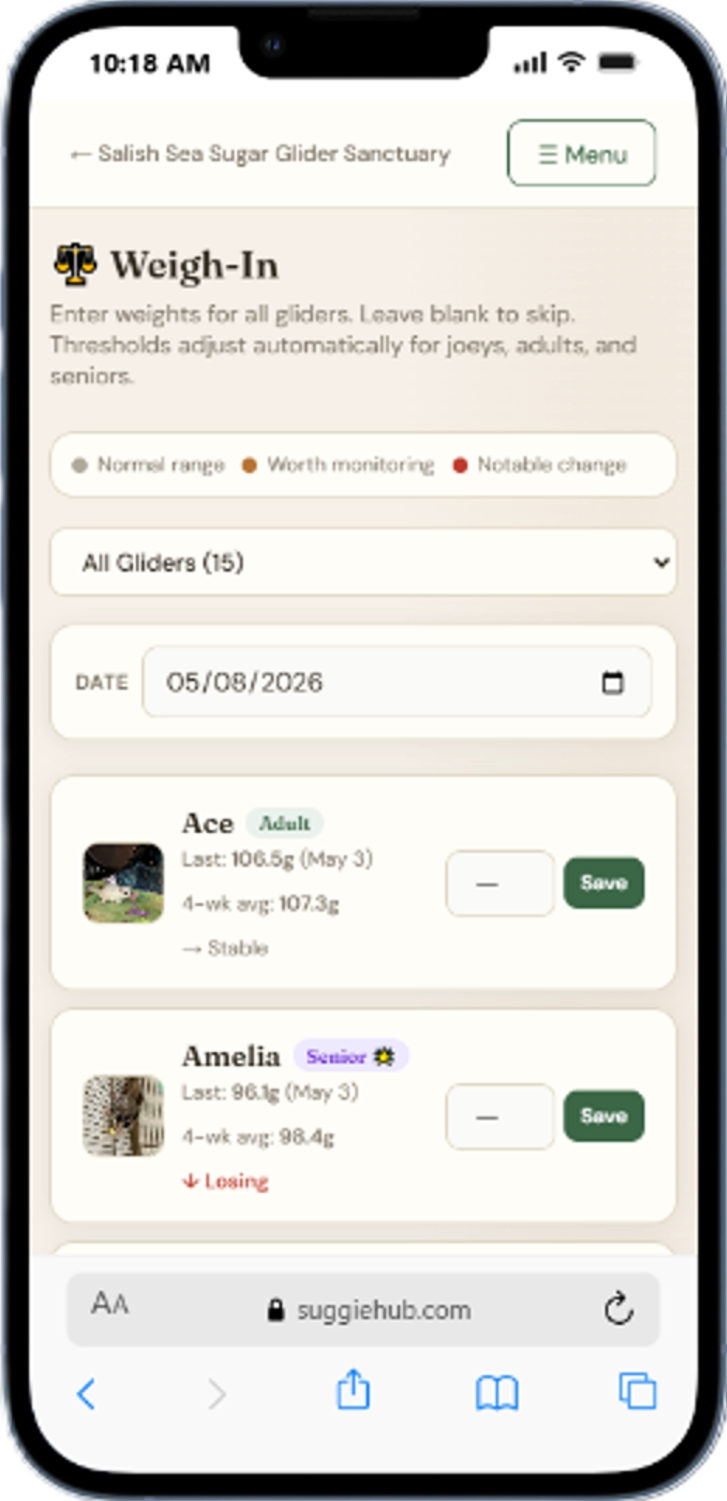
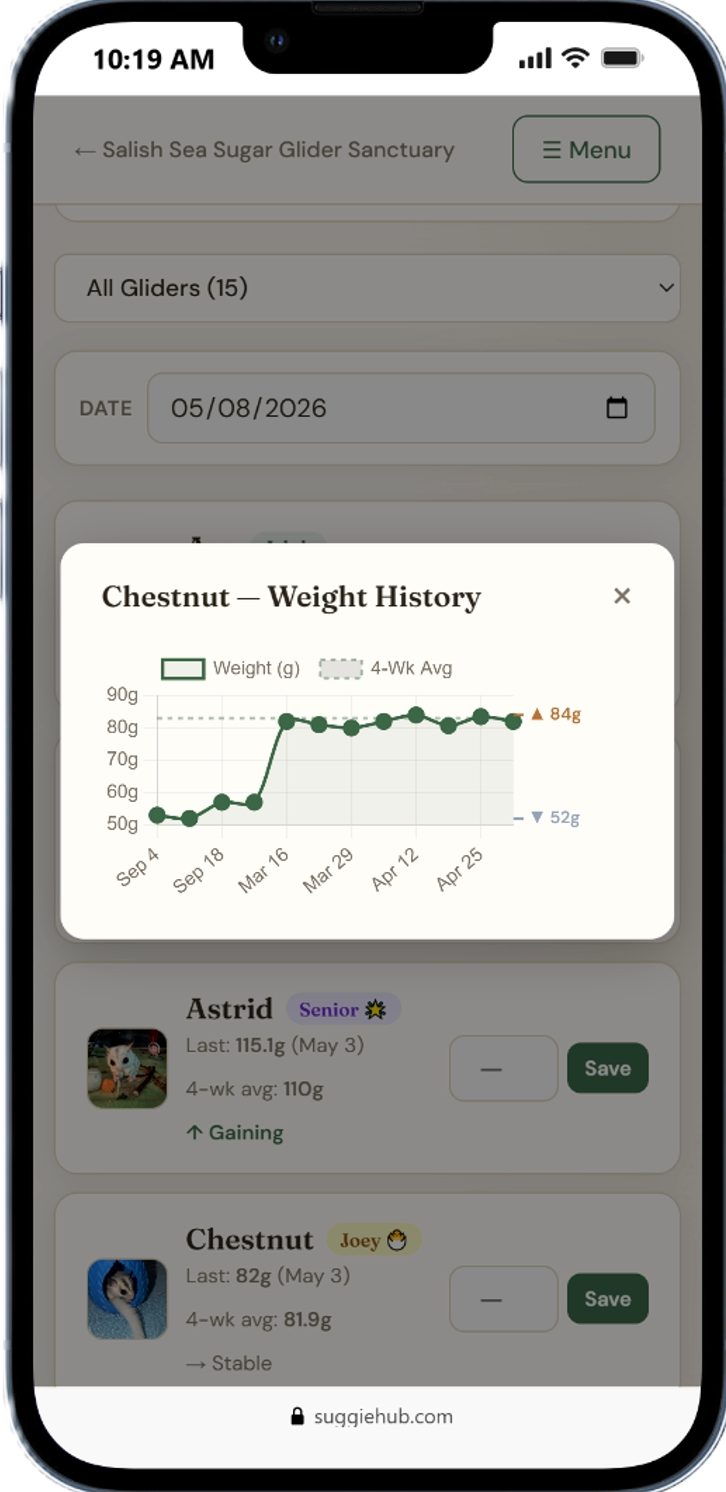
Sugar glider bulk colony weigh-in page Sugar glider bulk weigh-in verification step

Common questions

How many gliders can I weigh at once?
There's no limit. The bulk weigh-in page displays every glider in your journal regardless of colony size. Whether you have two gliders or forty, they all appear on the same page. The page is organized by cage so you can work through one cage at a time in a logical order.
What do the color dots mean?
Green means the glider's weight trend is stable and within normal range relative to their personal baseline. Yellow means there's a meaningful shift worth watching over the next few weigh-ins — not alarming, but worth attention. Red means the rolling average has dropped enough to cross a concern threshold, which warrants a closer look at that glider and potentially a vet consult. The thresholds are calibrated to life stage, so a joey and an adult are evaluated differently.
Can I skip gliders I didn't weigh?
Yes, and this is by design. Leave the weight field blank for any glider you didn't weigh and no entry will be saved for them. The bulk weigh-in only creates records for gliders where you entered a number. There's no placeholder, no zero, no gap-filling — just accurate records for the gliders you actually weighed.
Does bulk weigh-in use the same data as individual tracking?
Yes, completely. Entries saved through the bulk weigh-in appear in the same weight history as entries logged through an individual glider's profile. The chart, rolling average, and concern flags all use the same data regardless of how the entry was recorded. There's one data store — the method of entry doesn't matter.
Is it designed for rescues?
Yes. The bulk weigh-in was designed with rescues in mind from the start. Rescues typically have large numbers of animals to track, frequent intake and adoption activity, and limited time per animal. The one-page format, cage-grouped organization, and verify-before-save workflow are all features that matter specifically at rescue scale. SuggieHub also supports rescue-specific features like intake IDs, adoption records, and foster tracking — all integrated with the same weight history system.

Free for owners, rescues, and breeders.

No credit card. No app to download. Weigh your colony in minutes.

Create your free journal →